
Getting Started
-
- Identity Provider (IdP): The Foundation of Sastrify Insights
- Integrating HRIS to Enrich Identities & Insights
- Admin Guide: Deploying the Sastrify Chrome Extension
- Admin Guide: Deploying the Sastrify Microsoft Edge Extension
- Manual Installation Guide: Sastrify Chrome Browser Extension
- Manual Installation Guide: Sastrify Edge Browser Extension
- Setting renewal dates & reminders
- Assigning & Modifying Tool Owners
- Uploading & Managing Your SaaS Documents in Sastrify
- Sastrify App Support: Get Help & Give Feedback
- Sastrify's commitment to security and privacy standards
-
- Capturing Subscription Details with Contract AI
- Adding a New Subscription Manually
- Slack Integration: Bringing Sastrify into Your Internal Communication
- How to bulk upload your invoices
- Automating Document Uploads via Email Forwarding
- Managing Your Notification Preferences
- Tools and Spend Importer: Bulk Upload & Visualization
- Align vendor names using the Tool Matching feature
- Sunset or delete inactive subscriptions
-
- Workflows: Automate procurement processes with consistency
- Requests: Streamline procurement process and internal approval
- Get expert procurement support for new purchases and renewals
- How to submit and track Procurement Requests via Jira Integration
- Scope of service: Custom benchmarking & contract review
- Scope of service: Negotiation & renewal support
- Scope of service: Custom SaaS Optimization Advisory
- Purchase your SaaS through the SastriMarket
-
- Connecting Your ERP & Accounting Software
- Spend Import: Validate and fine-tune your imported spend data
- How to connect Workday ERP
- How to connect Microsoft Dynamics 365
- How to connect NetSuite
- How to connect Quickbooks
- How to integrate Pleo with Sastrify
- Export spend data from Candis to Sastrify
- Export spend data from Spendesk to Sastrify
- Export spend data from Pleo to Sastrify
- Export spend data from Moss to Sastrify
- Export spend data from DATEV to Sastrify
- Export spend data from Ramp to Sastrify
-
- Configure and manage your authentication settings
- Understanding user roles and permissions
- Configuring Microsoft SSO Authentication for Sastrify
- Configuring Okta SSO Authentication for Sastrify
- Configuring JumpCloud SSO Authentication for Sastrify
- Configuring Cisco Duo SSO Authentication for Sastrify
- Configuring OneLogin SSO Authentication for Sastrify
- Configuring Cloudflare SSO Authentication for Sastrify
- Having trouble logging in?
-
- ERP & Accounting Integration FAQs
- SSO / IDP Discovery Integration FAQs
- Browser Extension FAQs
- HRIS Integration FAQs
- Usage Analytics FAQs
- Contract AI & Subscription Details FAQs
- Tools and Spend Importer FAQs
- Invoices FAQs
- Achieved Savings FAQs
- Form component guide for Sastrify form builder
- What is SaaS and Sastrify's scope of work?
- Who can invite a new user?
- Who receives the renewal alerts or reminders?
- How does Sastrify work with currencies?
- Is the spend data from accounting export always up-to-date?
- How to work with benchmark prices
- When and how to involve Sastrify in a contract evaluation or negotiation?
- How does Sastrify interact with SaaS vendors?
- How do you handle confidentiality clauses in vendor contracts?
- Why is contract data essential for benchmarking and negotiation support?
Assigning & Modifying Tool Owners Print
Modified on: Wed, 11 Feb, 2026 at 7:21 PM
Assigning tool owners promotes a culture of accountability and ensures your entire SaaS ownership is optimized. A Tool Owner is the primary person responsible for monitoring, managing, and making renewal decisions for a specific application. These are also the people who know the ins and outs of specific tools and are typically responsible for making the purchase and renewal decisions for those tools.
Designating an owner in Sastrify enables that individual to perform and benefit from the following:
Renewal Alerts: Proactive notifications and countdowns to prevent missed renewal deadlines.
Direct Action: The ability to manage and update tool status directly within the platform.
How to Assign or Change a Tool Owner
You can manage ownership through three different areas of the platform.
Option 1: From the main Inventory Page
Navigate to Inventory > Suppliers & Products.
Click the three-dot icon (⋮) next to a subscription and select Edit Info.
In the Owner(s) field, select one or more individuals from the dropdown.
Click Save Changes.
Bulk Edit Tip: Select multiple subscriptions using the checkboxes on the left, then click Edit Details at the bottom right to assign one owner to many tools at once.Option 2: From an Individual Subscription Page
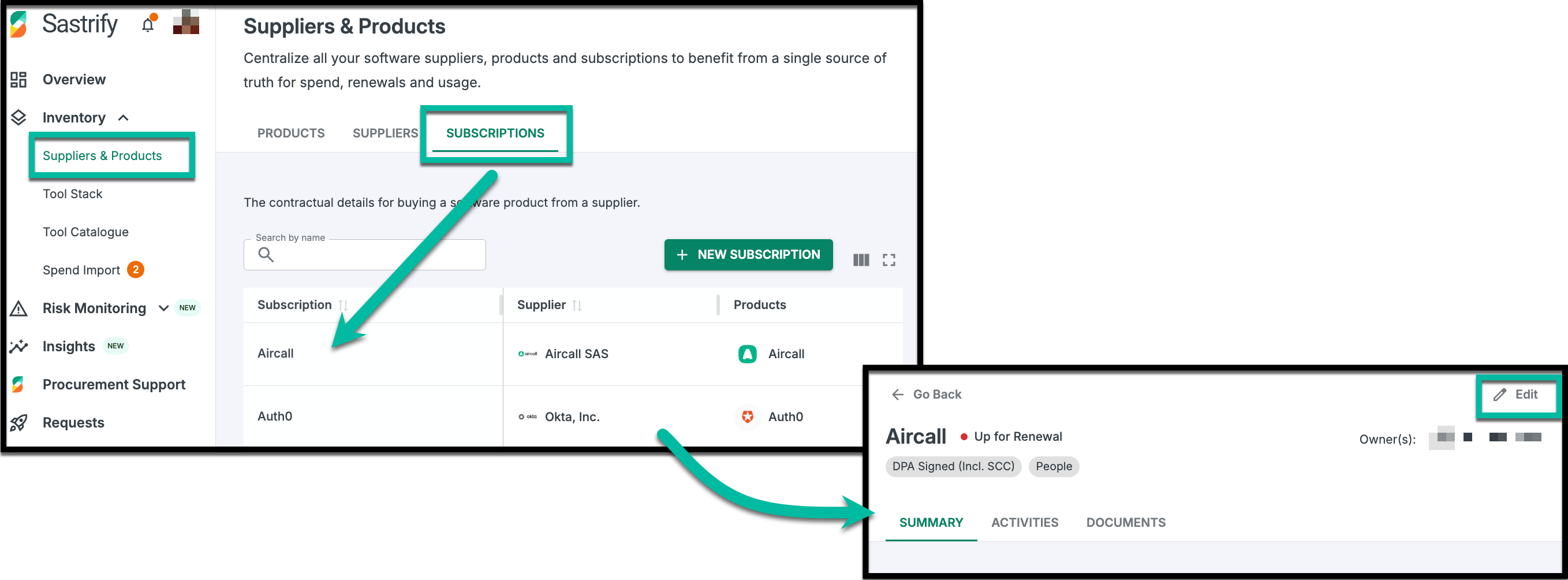
Go to Inventory > Suppliers & Products and click on a specific subscription.
Click the Edit button in the top right corner.
Update Owner(s) field and click Update Subscription.
Option 3: From User Management Page
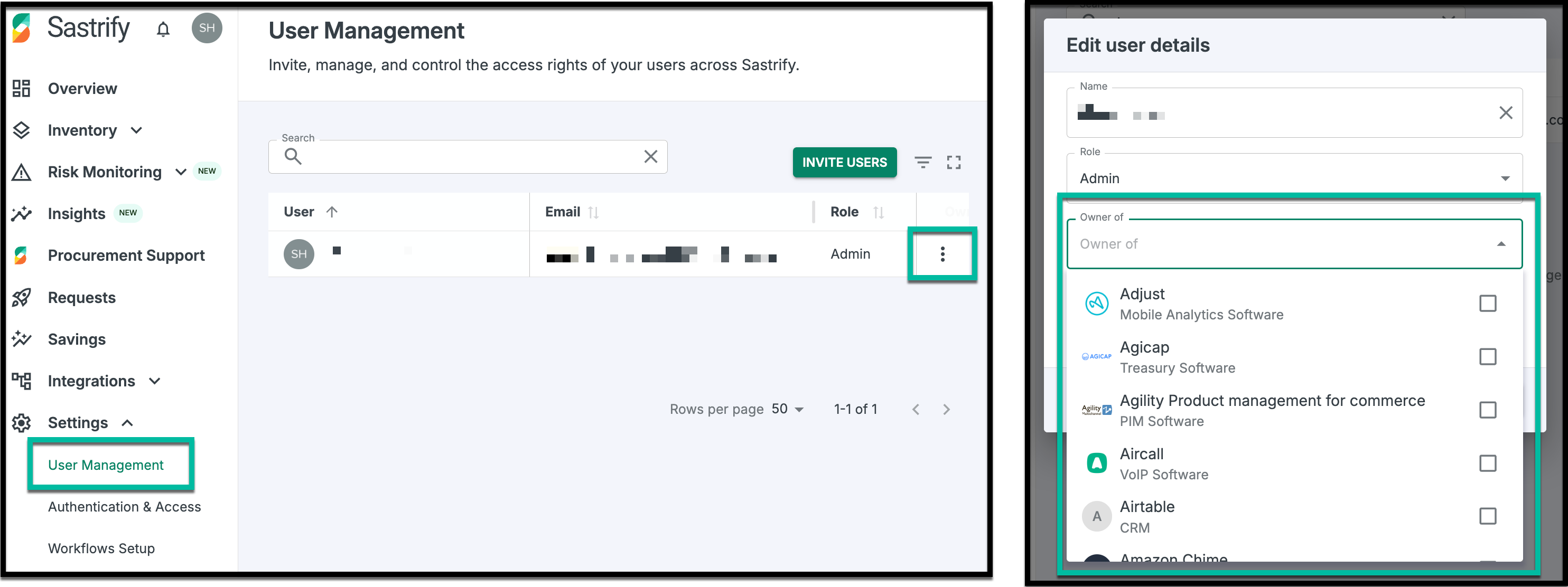
Go to Settings > User Management.
- Click the three-dot icon (⋮) next to a user and select Edit.
Under the Owner of field, select all relevant subscriptions.
Click Save Changes.
Frequently Asked Question
Q: I cannot assign a tool owner because when I click the drop-down menu, the person is not in the list. What should I do?
A: Before assigning someone as the tool owner of a subscription, you need to make sure that this person is already invited to Sastrify and is an active user.
Q: Can I assign multiple tool owners?
A: Yes, you can! You can assign one or multiple people to any subscriptions. This feature is there to improve accountability and management of shared tools, as well as to enhance collaboration and coverage, reducing the risk of missed renewals and unattended tools.
Did you find it helpful? Yes No
Send feedback